Loading kit backup data from an SD card (LOAD 1 KIT)
Here’s how kit backup data that was saved on an SD card can be loaded into the V71.
MEMO
You can also load V51 and V31 kit backup data.
- Insert the SD card into the V71.
- Ø “Side panel and front panel”
- Press the [BACKUP] button.
- Use the cursor buttons or the dial to select “LOAD 1 KIT” and press the [ENTER] button.
- The SD CARD LOAD 1 KIT screen appears.
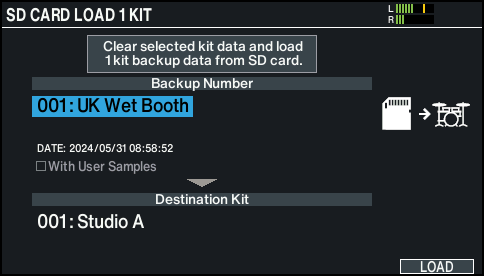
- Configure the load settings.
- Parameter select: use cursor buttons
- Value select: use [-] [+] buttons or dial

Parameter
Explanation
Backup Number
Selects the backup number.
The date of backup is shown in the backup data that’s saved when connected via Wi-Fi.
With User Samples
Selects whether user samples are also loaded.
Destination Kit
Selects the load destination drum kit.
- * It might take ten minutes or more to load the user samples.
- Press the [F6] (LOAD) button.
- A confirmation message appears.
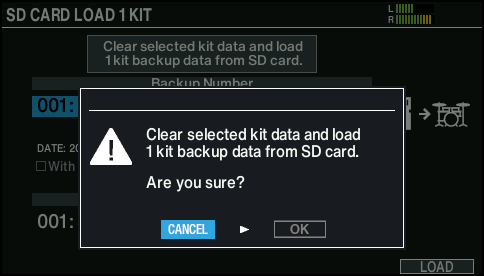
- If you decide to cancel, select “CANCEL” and press the [ENTER] button.
- Select “OK” and press the [ENTER] button.
- The backup data is loaded from the SD card.
- Press the [ENTER] button to finish the operation.