Restoring the factory settings
This restores the settings stored in the V71 to their factory default values.
This is called a “factory reset”.
NOTE
When you execute this operation, all data and settings in the V71 are lost. Before you proceed, you should save any important data and settings to your SD card.
- Select “FACTORY RESET” on the SETUP screen, and then press the [ENTER] button.
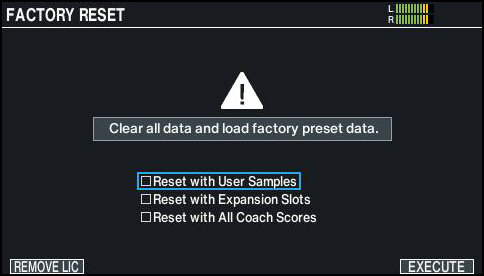
- The FACTORY RESET screen appears.

Parameter
Explanation
Reset with User Samples
Selects whether to restore all user samples that have been imported into the V71 to their factory settings.
- All user samples in user memory are overwritten by the factory-set data.
Reset with Expansion Slots
Selects whether to restore the Instrument Expansions and Kit Packs loaded into the slots to their factory settings.
Reset with All Coach Scores
Selects whether to erase the scores you recorded in coach mode.
- Press the [F6] (EXECUTE) button.
- A confirmation message appears.
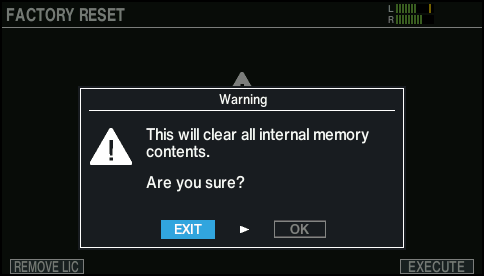
- If you decide to cancel, select “EXIT” and press the [ENTER] button.
- Select “OK” and press the [ENTER] button.
- This executes the factory reset.
- Press the [ENTER] button to finish the operation.