Editing the effects by using the knobs
Selecting the effect block to edit
- Turn the [SELECT] knob to select the effect block that you want to edit.
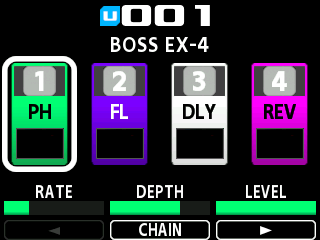
- A white border is shown around the selected effect block.
Editing the effects
- Turn knobs [1]–[3] to change the values for the parameters.
- On the screen below, you can use the knobs to operate the RATE, DEPTH and LEVEL parameters for the PH (phaser) that’s assigned to the FX1 block.
- The words shown inside white borders below the parameters (such as “CHAIN”) show the screen that opens when you press the corresponding knob. On the screen below, when you press the [2] knob, CHAIN (effect chain) is displayed.
- When “Í” and “Ë” are shown to the left and right of “CHAIN”, press the [1] knob to show the previous three parameters, and press the [3] knob to show the next three parameters.
MEMO
When you turn the [1]–[3] knobs, the corresponding values are shown.
Turn the [1]–[3] knobs while pressing them to change the values in larger steps.
Follow the steps shown in Saving memories (WRITE) to save your edits as a user memory. If you don’t save the memory, the edited settings are lost when you turn off the power or switch to another memory.