Saving memories (WRITE)
When you want to save your edits, follow the steps below to save them as a user memory. If you don’t save the memory, the edited settings are lost when you turn off the power or switch to another memory.
- Long-press the [MENU/EXIT] button.
- The WRITE MENU screen appears.
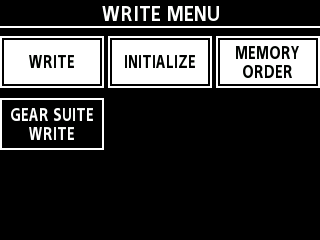
- Turn the [SELECT] knob to move the cursor to the row containing “WRITE”.
- Press the [1] knob.
- The MEMORY WRITE screen appears.
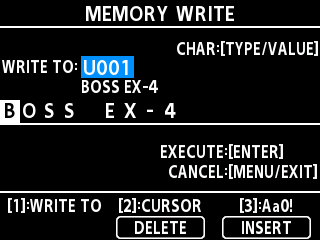
- Turn the [1] knob to select the save destination (U001–U128).
- You can’t overwrite the presets P001 and up.
- Use the operation below when you want to change a memory’s name.

Operation
Function
Turn the [TYPE/VALUE] knob
Changes the character type (space, uppercase letters, lowercase letters, numbers, symbols)
Turn the [SELECT] knob or the [2] knob
Moves the cursor
Press the [2] knob
Deletes one character (DELETE)
Turn the [3] knob
Changes the character type (uppercase, lowercase, numbers, symbols)
Press the [3] knob
Inserts character before cursor (INSERT)
- Press the [TYPE/VALUE] knob to save the data.
- The unit returns to the play screen when saving is finished.
WRITE MENU functions
Menu | Function |
|---|---|
WRITE | Saves the edited contents to memory. |
INITIALIZE | You can restore (initialize) each effect in a user memory to its standard settings. This is useful when you want to create a new memory from scratch. |
MEMORY ORDER | You can change the order of user memories U001–U128. |
GEAR SUITE WRITE | You can save the settings of your each effect as a GEAR SUITE. |