Configuring the effect settings (EFX SET)
Here’s how to configure the bus routing and effects.
- Hold down the [SHIFT] button and press the pad [13].
- The UTILITY MENU screen appears.
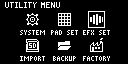
- Use the [VALUE] knob to select “EFX SET” and press the [VALUE] knob.
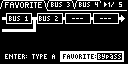
- The effect setting screen appears. Each parameter is shown as divided into six tabs.
MEMO
- From the top screen, you can also make this screen appear by pressing pad [16] while holding down the [SHIFT] button.
- Turn the [CTRL 3] knob to select a tab.
- Select the tab of the parameter you want to edit.

Tab
Explanation
FAVORITE
Use the [VALUE] knob to select the BUS 1 and BUS 2 routing as well as the FAVORITE (BUS 3/BUS 4 preset setting).
BUS 3, BUS 4
Edits the parameters of BUS 3 and BUS 4.
SIDE CHAIN
Edits the parameters of the side chain compressor.
DIRECT
You can assign the effects you like to the effect buttons on the top panel.
OTHER
Sets other parameters.
- Use the [VALUE] knob to move the cursor to the parameter you wish to edit, and press the [VALUE] knob.
- The value display is highlighted. You can now edit the value.
- For details on the parameters, refer to “EFX SETTING”.
- Turn the [VALUE] knob to edit the value, and press the [VALUE] knob.
- Press the [EXIT] button to return to the UTILITY MENU screen.
Additional information
- Configuring the bus routing
- Using effects with BUS 3, BUS 4 (FAVORITE)
- Editing the effects for BUS 3 and BUS 4 (BUS 3, BUS 4)
- Applying side chain compression (SIDE CHAIN)
- Assigning the desired effect to an effect button (DIRECT FX)
- Configuring the input effects (INPUT FX)
- Configuring the output destination for external input