EFX SETTING
FAVORITE
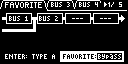
Parameter | Value | Explanation |
|---|---|---|
Routing | TYPE A, TYPE B | Selects whether the connection between BUS 1 and BUS 2 is serial (TYPE A) or parallel (TYPE B). |
FAVORITE | Bypass, 1–16 | Selects the slot (FAVORITE 1–16) where the BUS 3 and BUS 4 effect settings are saved. When the value is “Bypass”, the BUS 3 and BUS 4 effects are disabled. |
BUS 3, BUS 4
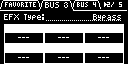
Parameter | Value | Explanation |
|---|---|---|
EFX Type | Bypass, 303 VinylSim, 404 VinylSim, Cassette Sim, Lo-fi, Downer, Compressor, Equalizer, Isolator, Super Filter, Filter+Drive, WrmSaturator, Overdrive, Distortion, Crusher, Ring Mod, SBF, Resonator, Hyper-Reso, Chromatic PS, Reverb, Ha-Dou, Zan-Zou, Sync Delay, TimeCtrlDly, Ko-Da-Ma, Tape Echo, Chorus, JUNO Chorus, Flanger, Phaser, Wah, Slicer, Tremolo/Pan, To-Gu-Ro, DJFX Looper, Scatter, SX Reverb, SX Delay, Cloud Delay | Selects the effects assigned to BUS 3 or BUS 4. For details on the parameters of each effect, refer to “MFX List”. |
SIDE CHAIN
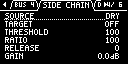
Parameter | Value | Explanation |
|---|---|---|
SOURCE | DRY, BUS 1, BUS 2, BUS 3, BUS 4 | Selects the bus (source bus) that activates the compression. |
TARGET | OFF, DRY, BUS 1, BUS 2, BUS 3, BUS 4 | Selects the bus (target bus) to which the compression is applied. |
THRESHOLD | 0–255 | Adjusts the volume threshold (threshold level) of the source bus, at which compression is applied to the target bus. The larger the value, the lower the threshold level is reduced, which applies compression at an even lower volume. |
RATIO | 0–255 | Adjusts the compression ratio applied to the excessive level of the source bus. Larger values apply deeper compression to the target bus, and extreme values reduce the volume to zero. |
RELEASE | 0–255 | Adjusts the time it takes for the compression effect to fade out (release time). The larger this value, the more gradually the target bus volume returns, and the effect continues for a while even after the source bus volume falls below the threshold level. |
GAIN | 0.0dB–6.0dB | Sets the amount that the final output is amplified (makeup gain). By adjusting this, you can raise the overall volume of the sound that has been lowered by compression. |
DIRECT
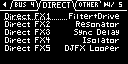
Parameter | Value | Explanation |
|---|---|---|
Direct FX1–Direct FX5 | Filter+Drive, Resonator, Sync Delay, Isolator, DJFX Looper, Scatter, Downer, Ha-Dou, Ko-Da-Ma, Zan-Zou, To-Gu-Ro, SBF, Stopper, Tape Echo, TimeCtrlDly, Super Filter, WrmSaturator, 303 VinylSim, 404 VinylSim, Cassette Sim, Lo-fi, Reverb, Chorus, JUNO Chorus, Flanger, Phaser, Wah, Slicer, Tremolo/Pan, Chromatic PS, Hyper-Reso, Ring Mod, Crusher, Overdrive, Distortion, Equalizer, Compressor, SX Reverb, SX Delay, Cloud Delay, Back Spin | You can assign the effects you like to the effect buttons on the top panel. For details on the parameters of each effect, refer to “MFX List”. |
OTHER
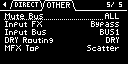
Parameter | Value | Explanation |
|---|---|---|
Mute Bus | Sets the scope of the mute bus. | |
ALL | The mute bus is applied to both BUS 1 and BUS 2. | |
BUS | The mute bus is applied only to buses that are selected using the [BUS FX] button. | |
Input FX | Bypass, Auto Pitch (*), Vocoder (*), Harmony (*), Gt Amp Sim (*), Chorus, JUNO Chorus, Reverb, TimeCtrlDly, Chromatic PS, Downer, WrmSaturator, 303 VinylSim, 404 VinylSim, Cassette Sim, Lo-fi, Equalizer, Compressor Effects marked with an (*) are for INPUT FX only. | You can apply effects to the audio that’s inputted to this unit. For details on the parameters of each effect, refer to “MFX List”. |
Input Bus | You can configure the output destination for INPUT and LINE IN (INPUT BUS). | |
DRY | Sends the signal to the DRY bus (the BUS 1 and BUS 2 effects are not applied). | |
BUS1, BUS2 | The signal is sent to BUS 1 or BUS 2. | |
DRY Routing | This sets the routing for audio sent to the DRY bus. | |
DRY | Audio is not sent through BUS 1–BUS 4 (no effects are applied). | |
BUS3 | Audio is inserted just before BUS 3. The BUS 3 and BUS 4 effects are applied. | |
MFX TOP | Scatter, Downer, Ha-Dou, Ko-Da-Ma, Zan-Zou, To-Gu-Ro, SBF, Stopper, Tape Echo, TimeCtrlDly, Super Filter, WrmSaturator, 303 VinylSim, 404 VinylSim, Cassette Sim, Lo-fi, Reverb, Chorus, JUNO Chorus, Flanger, Phaser, Wah, Slicer, Tremolo/Pan, Chromatic PS, Hyper-Reso, Ring Mod, Crusher, Overdrive, Distortion, Equalizer, Compressor, SX Reverb, SX Delay, Cloud Delay, Back Spin | Sets the MFX that’s used when this unit is turned on. For details on the parameters of each effect, refer to “MFX List”. |