Configuring the output destination for external input
You can assign the output destination for the external inputs (INPUT, LINE IN) to either BUS 1, BUS 2 or DRY.
MEMO
- Refer to “Audio diagram” for more on external input routing on the SP-404MK2.
- Hold down the [SHIFT] button and press the pad [13].
- The UTILITY MENU screen appears.
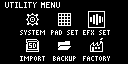
- Use the [VALUE] knob to select “EFX SET” and press the [VALUE] knob.
- The effect setting screen appears.
MEMO
- From the top screen, you can also make this screen appear by pressing pad [16] while holding down the [SHIFT] button.
- Turn the [CTRL 3] knob to select “OTHER”.
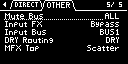
- Use the [VALUE] knob to move the cursor to “Input Bus” and press the [VALUE] knob.
- The displayed value is highlighted, and you can now edit the Input Bus.

Value
Explanation
DRY
Sends the signal to the DRY bus (the BUS 1 and BUS 2 effects are not applied).
BUS1, BUS2
The signal is sent to BUS 1 or BUS 2.
- Use the [VALUE] knob to select the bus, and press the [VALUE] knob.
- This confirms the bus to which the input audio is sent.
- To finish making settings, press the [EXIT] button.
MEMO
- You can also configure the above settings by pressing the [EXT SOURCE] button while holding down the [REMAIN] button in sample mode.
Ó “Assigning each sample to a bus”