Configuring the input effects (INPUT FX)
INPUT FX is an effect dedicated for use with external input (INPUT, LINE IN).
MEMO
- These are the same parameters as the “INPUT FX parameters”, which are used for sampling and resampling.
- For the INPUT FX routing, refer to “Audio diagram”. For how to configure the routing, refer to “Configuring the bus routing”.
- Hold down the [SHIFT] button and press the pad [13].
- The UTILITY MENU screen appears.
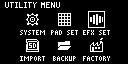
- Use the [VALUE] knob to select “EFX SET” and press the [VALUE] knob.
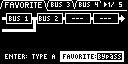
- The effect setting screen appears.
MEMO
- From the top screen, you can also make this screen appear by pressing pad [16] while holding down the [SHIFT] button.
- Turn the [CTRL 3] knob to select “OTHER”.
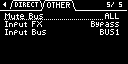
- Use the [VALUE] knob to move the cursor to “Input FX”, and press the [VALUE] knob.
- The value display is highlighted. You can now change the effects.
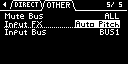

Parameter
Value
EFX Type
Bypass, Auto Pitch (*), Vocoder (*), Harmony (*), Gt Amp Sim (*), Chorus, JUNO Chorus, Reverb, TimeCtrlDly, Chromatic PS, Downer, WrmSaturator, 303 VinylSim, 404 VinylSim, Cassette Sim, Lo-fi, Equalizer, Compressor
MEMO
- Effects marked with an (*) are for INPUT FX only.
- For details on the various effect parameters, refer to “MFX List”.
- Use the [VALUE] knob to select the effect, and press the [VALUE] knob.
- This sets the effect.
- To finish making settings, press the [EXIT] button.