Configuring the bus routing
Refer to “Bus routings” and “Audio diagram” for the bus specifications on the SP-404MK2.
BUS 1, BUS 2 routing
The following shows how to switch the connections for BUS 1 and BUS 2 between serial (TYPE A) and parallel (TYPE B).
- Hold down the [SHIFT] button and press the pad [13].
- The UTILITY MENU screen appears.
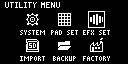
- Use the [VALUE] knob to select “EFX SET” and press the [VALUE] knob.
- The effect setting screen appears.
MEMO
- From the top screen, you can also make this screen appear by pressing pad [16] while holding down the [SHIFT] button.
- Use the [CTRL 3] knob to select “FAVORITE”, and press the [VALUE] knob.
- The BUS 1 and BUS 2 connection changes each time you press the [VALUE] knob.
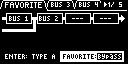
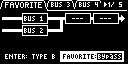
- To finish making settings, press the [EXIT] button.
DRY bus routing
For the output destination of the DRY bus, you can set “DRY Routing” in “OTHER” (EFX SETTING screen) to either after BUS 4 (“DRY”) or before BUS 3 (“BUS 3”).
Ó “EFX SETTING”
External input (INPUT, LINE IN) routing
For the output destination of INPUT and LINE IN (INPUT BUS), you can set “Input Bus” in “OTHER” (EFX SETTING screen) to either “DRY”, “BUS 1” or “BUS 2”.
Ó “Configuring the output destination for external input”
Ó “EFX SETTING”
External input (USB) routing
The output destination of the audio signal input from USB can be set from “USB In” in “GENERAL” (SYSTEM screen), to either merge before INPUT FX and pass through the input bus (“LINE IN”), or to mix with the final output without applying effects (“MIX OUT”).
Ó “SYSTEM”