Example: settings for the VH-14D
- Press the [SETUP] button.
- Use the cursor buttons to select “TRIGGER”, and press the [ENTER] button.
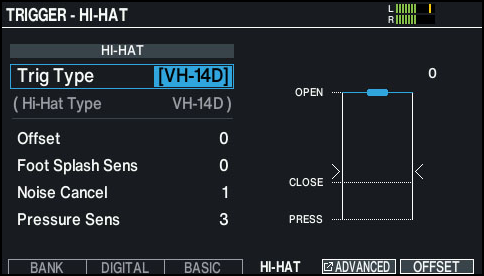
- Press the [F4] (HI-HAT) button.
- The TRIGGER - HI-HAT screen appears.
- Make sure that Trig Type is set to “VH-14D”.
MEMO
“VH-14D” is not shown for the Trig Type if the VH-14D is not connected or if it is not assigned to the hi-hat. If this happens, connect the VH-14D and assign it to the hi-hat.
Ø “Configuring pads that support digital connection (sold separately)”
- Press the [F6] (OFFSET) button.
- The HI-HAT OFFSET ADJUSTMENT screen appears.
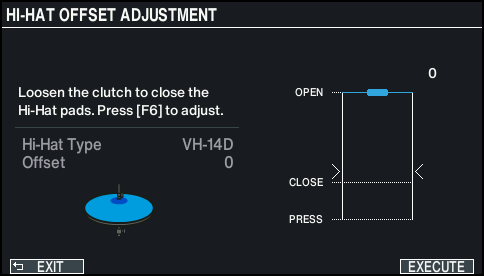
- Loosen the clutch screw of the VH-14D so that the hi-hat is closed.
- Do not touch the hi-hats or the pedal.
- Press the [F6] (EXECUTE) button.
- “Processing...” is shown once calibration begins.
- “Complete!” is shown once calibration is finished, and the display returns to the TRIGGER screen.
- Press the [KIT] button to return to the KIT screen.
- Make detailed adjustments to the parameters as necessary.
- Ø“Data List” (Roland website)