Editing the settings and viewing the information for each song
You can set the song volume and method of playback. You can also view the song information.
- Select a song on the SONG screen.
- Ø “Playing along with the songs on the V51”
- Press the [F5] (SETUP/INFO) button.
- The SONG SETUP/INFO window appears.
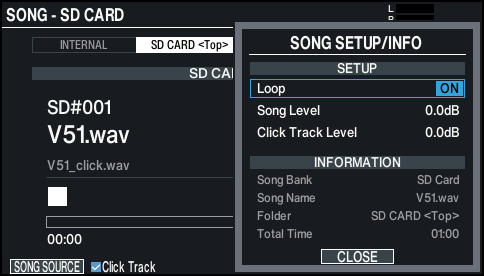

Parameter
Value
Explanation
SETUP
Loop
OFF
The song plays back only once and then stops.
ON
The song plays repeatedly.
Song Level
-INF–+12.0dB
Volume of the song
Click Track Level
Volume of the click track
- Only if there is a click track corresponding to the song
INFORMATION
Song Bank
Song save location (temporary area in internal storage, or SD card)
Song Name
Song name
Folder
Song save location on SD card
Total Time
Song playback time
- This is not shown for songs containing only a drum performance.
- Press the [F5] (CLOSE) button.