Recording as SMF (DRUM REC)
Here’s how to record what you play as SMF data (MIDI).
- Press the [ó] button.
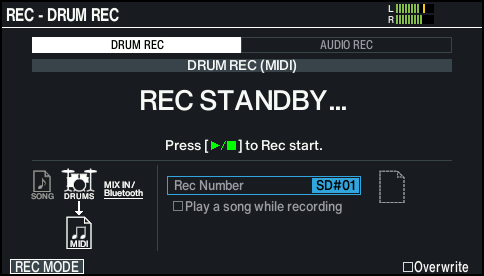
- The REC screen appears, and the unit enters record-standby mode.
MEMO
If you want to record along with the click, make the click play.
Ø “Using the Click”
- Press the [F1] (REC MODE) button to show the REC MODE window.
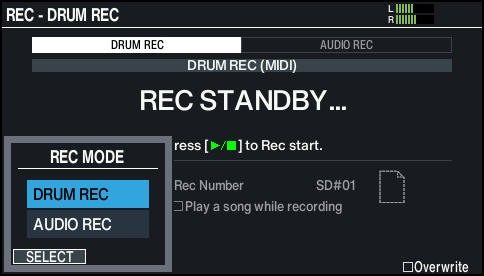
- Use the cursor [É] [Ç] buttons or the dial to select “DRUM REC”, and press the [F1] (SELECT) button.
- The REC - DRUM REC screen appears.
- Use the cursor buttons and the dial to change the recording settings.

Parameter
Value
Explanation
Rec Number
TEMPORARY
Records to temporary memory on this unit (one song).
SD#01–99
Records to an SD card (up to 99 songs).
This cannot be selected if you have not inserted an SD card into the V51.
NOTE
Recorded data saved to the temporary area on this unit is erased once you turn off the power. Export any important data or settings to your SD card before you do this.
Ø “Exporting the DRUM REC recorded data to an SD card (SONG EXPORT)”
MEMO
If you don’t mind overwriting your previously recorded data, press the [F6] (Overwrite) button to select the “Overwrite” check box. Deselecting the check box helps prevent you from accidentally overwriting the recorded data.
- Press the [ò] button to start recording.
- Press the [ò] button to stop recording.
- The SONG - DRUM REC DATA screen appears.
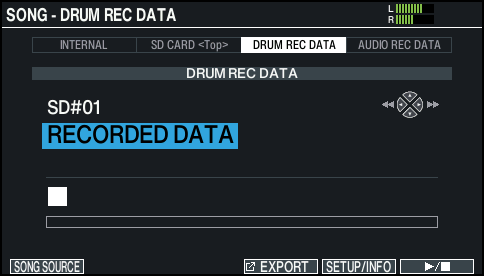
- Press the [ò] button to start playback.
- The recorded performance plays back.
MEMO
You can use the dial to select different songs that are recorded.
- Press the [ò] button to end playback.
MEMO
- You can export the data you recorded.
- Ø “Exporting the DRUM REC recorded data to an SD card (SONG EXPORT)”
- You can also record your drum playing along with a song.
- Ø “Recording your performance along with a song”