Exporting the DRUM REC recorded data to an SD card (SONG EXPORT)
You can export the data you’ve recorded with DRUM REC to an SD card as an audio file (WAV) or SMF.
- Select a song on the SONG screen.
- Ø “Playing along with the songs on the V51”
- Press the [F4] (EXPORT) button.
- The DRUM REC DATA EXPORT screen appears.
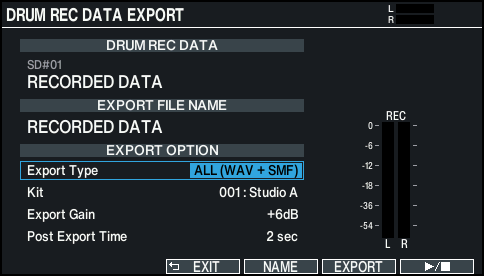
- Use the cursor [É] [Ç] buttons to select a parameter, and use the [-] [+] buttons or the dial to edit the value.

Parameter
Value
Explanation
Export Type
SMF
Exports the drum performance to SMF format.
WAV (Drums)
Exports the drum performance to an audio file.
WAV (Drums with song)
Exports the drum performance and song audio to an audio file.
- You can’t select for data that was recorded using the “DRUMS ONLY” setting.
SMF + WAV
Exports the drum performance to both an audio file and an SMF.
Kit
001–200
An audio file is exported using the selected drum kit sound.
Export Gain
0–+24dB
Press the [F6] (ò) button to play back a preview of the recorded data (the export results). Adjust the audio file volume while checking the output level meters. Positive values increase the volume.
Post Export Time
0–10 sec
The tail end of the sound may get chopped off when you export an audio file. If this happens, increase this value to prevent this problem.
MEMO
Press the [F4] (NAME) button to add a name to the file for export.
- Press the [F5] (EXPORT) button.
- A confirmation message appears.
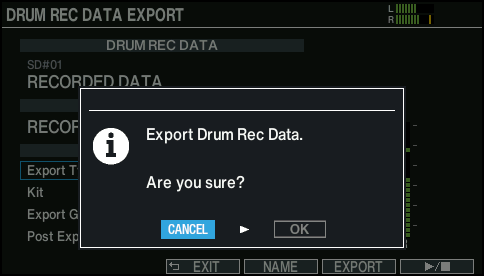
- If you decide to cancel, select “CANCEL” and press the [ENTER] button.
- Select “OK” and press the [ENTER] button.
- The export begins.
- Exported data is saved in the “EXPORT” folder.
NOTE
Never do any of the following things while data is being exported. Doing so may cause your recorded data to be lost.
- Turning the power off
- Removing the SD card
- Playing the pads
MEMO
- If export data exists with the same filename, the message “Duplicate file name! / Overwrite?” appears. Select “OK” and press the [ENTER] button to overwrite. Select “CANCEL” and press the [ENTER] button to cancel. Change the filename and try exporting again.
- To cancel the export while in progress, press the [F6] (CANCEL) button.
- When you save your drum performance in SMF format, the note numbers corresponding to the MIDI settings for the drum kit or in SETUP are outputted.
For details, refer to “Data List” (Roland website).