Adjusting the attack and release (TRANSIENT)
You can adjust parameters such as the attack and release (the transients) for each instrument.
- You may not be able to configure these for certain instrument or user sample settings.
- On the INSTRUMENT screen, press the [F3] (TRANSIENT) button.
- The INSTRUMENT - TRANSIENT screen appears.
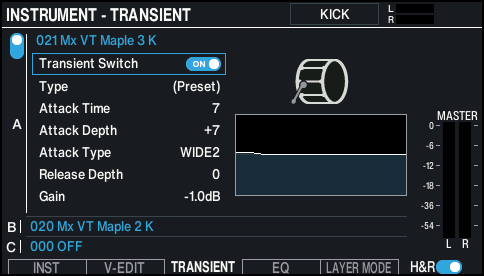
- Select the pad to configure.
- Ø “Selecting the pad to set”
- Use the cursor buttons to select a parameter, and use the [-] [+] buttons or the dial to edit the value.

Parameter
Value
Explanation
Transient Switch
OFF, ON
Turns the transient effect on/off.
Type
(Preset), Type 1–4
This lets you set the effects when the transient is applied to a user sample (For the built-in sounds, “(Preset)” is shown—these cannot be edited).
Attack Time
1–10
Time over which the attack changes
Attack Depth
-100–+100
Adjustment for the attack
Attack Type
NORMAL, WIDE 1, WIDE 2
For the “NORMAL” setting, the transient attack effect is always applied.
For the “WIDE 1” or “WIDE2” setting, the attack effect becomes weaker when you strike the pad more softly. This is effective if you want an increasingly stronger attack when striking the pads harder.
Release Depth
-100–+100
Adjustment of the release
Gain
-12.0–+6.0dB
Volume following transient adjustment
MEMO
Press the [F4] (Transient) button while holding down the [SHIFT] button to turn the transient of the currently selected layer on/off.
- Press the [KIT] button to return to the KIT screen.