Adjusting the tonal character of an instrument (EQ)
Here’s how to adjust the equalization (tonal character) for an instrument.
- On the INSTRUMENT screen, press the [F4] (EQ) button.
- The INSTRUMENT - EQ screen appears.
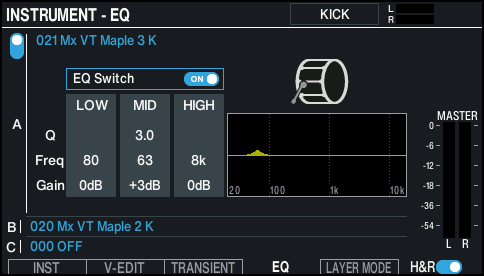
- Select the pad to configure.
- Ø “Selecting the pad to set”
- Use the cursor buttons to select a parameter, and use the [-] [+] buttons or the dial to edit the value.

Parameter
Value
Explanation
EQ Switch
OFF, ON
Turns the equalizer on/off.
LOW Freq
20–1k (Hz)
Center frequency of the low range
LOW Gain
-24–+24 dB
Amount of boost/cut for the low range
MID Freq
20–16k (Hz)
Center frequency of the mid range
MID Q
0.5–16.0
Width of the frequency range
Higher values make the bandwidth narrower.
MID Gain
-24–+24 dB
Amount of boost/cut for the mid range
HIGH Freq
1k–16k (Hz)
Center frequency of the high range
HIGH Gain
-24–+24 dB
Amount of boost/cut for the high range
MEMO
Press the [F4] (EQ) button while holding down the [SHIFT] button to turn the equalizer on/off for the selected layer.
- Press the [KIT] button to return to the KIT screen.