Configuring how the layers play (LAYER MODE)
You can also switch between layers according to the force of your strike, or vary the balance between them.
- On the INSTRUMENT screen, press the [F5] (LAYER MODE) button.
- The INSTRUMENT - LAYER MODE screen appears.
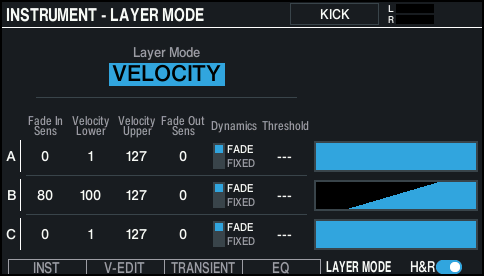
- Select the pad to configure.
- Ø “Selecting the pad to set”
- Use the cursor buttons to select a parameter, and use the [-] [+] buttons or the dial to edit the value.

Parameter
Value
Explanation
Layer Mode
MIX
Plays the instruments of layers together for which the layer switch is on.
VELOCITY
Sets how the instruments for each layer respond to velocity.
HI-HAT (*1)
Instrument layer A plays when you trigger an open hi-hat, layer B plays when you trigger a closed hi-hat, and the instrument for layer C plays when you trigger a foot close.
When Layer Mode = VELOCITY
Fade In Sens (*2)
0–127
Sets the change in volume according to how hard you strike the pad, when the instrument begins to play.
Velocity Lower (*2)
1–127
Specifies the force of the strike at which the instrument begins to sound.
Velocity Upper (*2)
1–127
Specifies the force of the strike from which the instrument stops playing.
Fade Out Sens (*2)
0–127
When you play with a force equal or greater than the setting, the instrument gets quieter according to the Velocity Upper setting.
Dynamics
FADE
Makes the instrument sound according to how hard you play.
FIXED
When you play with a force equal to or greater than the “Threshold” setting, the instrument plays at the same volume regardless of how hard you play.
Threshold
1–127
Sets how hard you must strike the pads to make the sound start playing, when Dynamics is set to “FIXED”.
- *1: This is enabled when the pad to set is the hi-hat, and when the instrument is set to SYNTH WAVE or USER SAMPLE (Play Type = ONE SHOT).
- *2: This is enabled when Dynamics is set to “FADE”.
- Press the [KIT] button to return to the KIT screen.
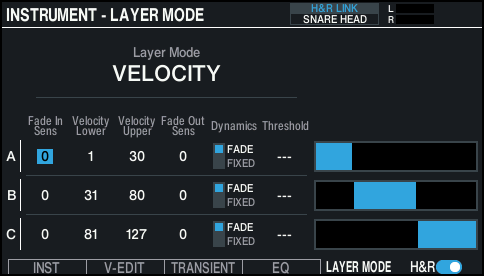
Example of LAYER MODE settings
This setting switches between layers AÓBÓC in that order, according to how hard you strike the pad.