Muting the sound of a specific pad when you strike a pad (MUTE GROUP)
Mute group settings let you specify that when you strike a pad, other pads in the same mute group are muted (silenced).
For example, you can assign user samples for the instruments of each pad, and configure the mute group so that you can switch between these user samples by striking different pads.
- Select “MUTE GROUP” on the KIT OTHERS screen, and then press the [ENTER] button.
- The PAD MUTE GROUP screen appears.
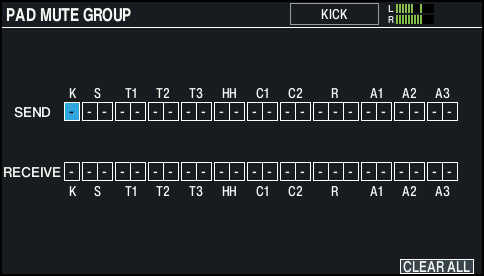
- Select the pad to configure.
- Ø “Selecting the pad to set”
- You can also select using the cursor buttons.
- Use the cursor buttons, the [-] [+] buttons or the dial to configure the mute group settings.

Parameter
Value
Explanation
SEND
- (OFF), 1–8
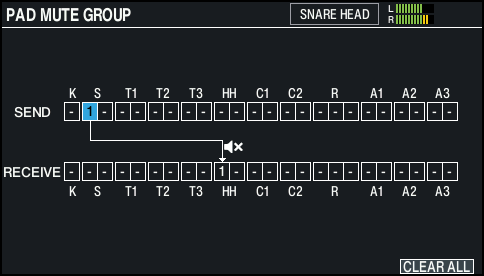
These parameters specify the mute group number.
When you strike the pad of the number specified in SEND, the sound of the pad assigned to the same number in RECEIVE is muted.
- The pads are not muted even if you specify the same trigger (the pad or strike point) for both SEND and RECEIVE.
RECEIVE
- When you specify a mute group, an arrow indicates the pads that are muted when you strike the currently selected pad, and the pads that when struck will mute the currently selected pad.
MEMO
To clear all mute groups, press the [F6] (CLEAR ALL) button.
- Press the [KIT] button to return to the KIT screen.