Adjusting the sensitivity for individual pads
Because the following settings are automatically set to the appropriate values for each pad when you specify the trigger type, there is normally no need for you to edit them.
You can edit these settings if you want to make finer adjustments, or if you want to use an acoustic drum trigger.
- On the TRIGGER - BANK screen, press the [F3] (BASIC) button.
- The TRIGGER - BASIC screen appears.
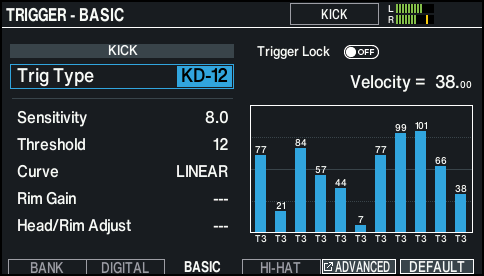
- Select the pad to configure.
- Ø “Selecting the pad to set”
- Use the cursor buttons to select a parameter, and use the dial to edit the value.

Parameter
Value
Explanation
Sensitivity
1.0–32.0
Adjusts the sensitivity of the pads, which lets you control the balance between how hard you strike the pads and the volume.
Increasing this value increases the sensitivity, so that even soft strikes on the pad play the sound at higher volumes. Decreasing this value decreases the sensitivity, so that even hard strikes on the pad play the sound at lower volumes.
Threshold
0–31
Adjusts the minimum sensitivity of the pads.
This setting allows a trigger signal to be received only when a pad is struck above a determined force level (velocity). This can be used to prevent a pad from sounding due to vibrations from other pads. In the following example, B will sound but A and C will not sound.
Check this and adjust accordingly. If a soft strike on the pad fails to make a sound, slightly lower this value. Repeat this to obtain the ideal setting.
Curve
Adjusts how the volume changes in response to how hard you strike the pad.
LINEAR
This is the standard setting. This produces the most natural balance between playing dynamics and volume change.
EXP1, EXP2
Compared to “LINEAR”, strong dynamics produce a greater change.
LOG1, LOG2
Compared to “LINEAR”, a soft playing produces a greater change.
SPLINE
Extreme changes are made in response to your playing dynamics.
LOUD1, LOUD2
Very little dynamic response, making it easy to maintain strong volume levels. If you’re using a drum trigger as an external pad, these settings will produce reliable triggering.
Rim Gain (*1)
0–3.2
Adjusts the balance between the force of striking the rim or edge and the loudness of the sound.
If you increase this value, even soft strikes on the rim play at high volume. If you decrease this value, even strong strikes on the rim are sounded at low volume.
This is available for pads that support rim shots.
Head/Rim Adjust (*1)
0–80
This setting specifies how easy it is to play a head shot or rim shot.
If the rim sound is heard when you strike the head strongly, increase this value.
If the head sound is heard when you play an open rim shot, decrease this value.
If the head sound is heard when you softly play a rim shot, decrease this value.
MEMO
If the rim shot sound is heard when you play a head shot, or if a head shot sound is heard when you play a rim shot, make small changes to the Head/Rim Adjust values while you continue trying out the results. Extreme changes to the values will cause the wrong sound to be heard when you strike the pad, for example producing the rim shot sound when you play a head shot.
- *1: This setting is not available for some trigger types.
MEMO
- To return to the default values, press the [F6] (DEFAULT) button. Trigger parameters (with the exception of certain parameters such as cross-stick cancel) are set to the default value. For details, refer to “Data List” (Roland website).
- For the pads connected to the TRIGGER IN jacks, the velocity is shown as a value from 1 to 127; and for the pads that support HI-Reso Velocity and are digitally connected to a DIGITAL TRIGGER IN port, the velocity is shown as a value from 1.00 to 127.00 (when MIDI CONTROL HI-Reso Velocity is “ON”). For details, refer to “Data List” (Roland website).
- Press the [F6] (CLEAR LOG) button while holding down the [SHIFT] button to erase the monitor history.