Making overall settings for the V51 (SETUP)
Here’s how to configure settings that are common to the entire V51, such as specifying the output destination of the V51, and making trigger settings.
- Press the [SETUP] button.
- The SETUP screen appears.
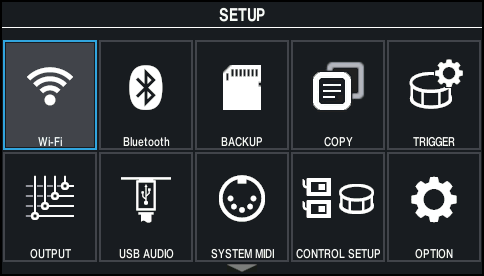
- Use the cursor buttons or the dial to select the menu that you want to edit, and press the [ENTER] button.

Menu
Explanation
Wi-Fi
Lets you connect the V51 to the Roland Cloud Connect app via Wi-Fi.
ØRefer to the “Roland Cloud Connect Setup Guide” (separate document).
Bluetooth
Configures the Bluetooth settings.
BACKUP
Saves (backs up) the settings of the V51 to an SD card, or restores (loads) the settings back to the V51.
COPY
Copies the various settings of the V51 internally or from an SD card.
TRIGGER
Configures the trigger settings.
Ø “Trigger settings”
OUTPUT
Specifies the output destination of the sounds.
USB AUDIO
Makes the USB audio settings.
SYSTEM MIDI
Configures the overall MIDI-related settings for the V51.
CONTROL SETUP
Assigns functions to the footswitches and pads.
OPTION
Configures the display, kit phrase and other settings.
AUTO OFF
Changes the Auto Off setting.
Ø “Making the power automatically turn off after a time (AUTO OFF)”
SYSTEM INFO
Used for checking how much memory is free on this unit, as well as the system program version.
FACTORY RESET
Restores the factory settings.
- Edit the settings according to the selected menu.