Selecting the type of pad connected to the WT-10 (INPUT CONFIGURATION)
Select the type of pad on the V51 (trigger settings).
For this example, we select the “CY-16R-T” cymbal.
- On the TRIGGER - ADVANCED screen, press the [F4] (DrumLink) button.
- Open the [F2] (BASIC) tab.
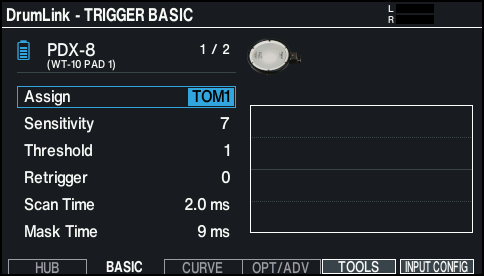
- Strike to select the pad that you want to set.
- You can also use the cursor buttons to move the cursor to the position shown in the illustration, and use the [-] [+] buttons or the dial to select the pad to set.
- Press the [F6] (INPUT CONFIG) button.
- The INPUT CONFIGURATION screen appears.
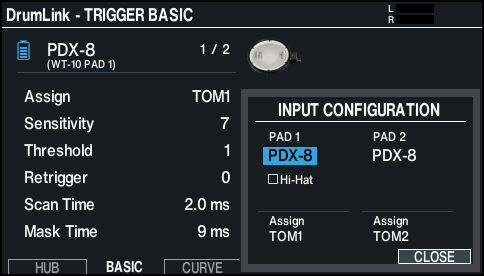
- Select “CY-16R-T” for PAD1 on the screen.
- An asterisk is shown to the left of the pad name (CY-16R-T). (An asterisk is shown whenever the internal settings have not yet been synchronized.)
MEMO
- When you change the pad type, the pad parameters aside from Assign are set to their optimum values. You can fine-tune the settings as appropriate, according to how you attach the pad and how you use it.
- You can also select a pad type from the list that’s shown when you press the [ENTER] button.
- Strike the cymbal once.
- Once the internal settings are synchronized, the asterisk to the left of the pad name (CY-16R-T) disappears.
MEMO
You can also press the [F5] (TOOLS) button and select “INPUT CONFIG” to view the INPUT CONFIGURATION screen.