Unpairing the V51 and the pads (unpairing)
Here’s how to unpair the V51 from the pads.
- On the TRIGGER - ADVANCED screen, press the [F4] (DrumLink) button.
- Press one of the [F2] (BASIC)–[F4] (OPT/ADV) buttons.
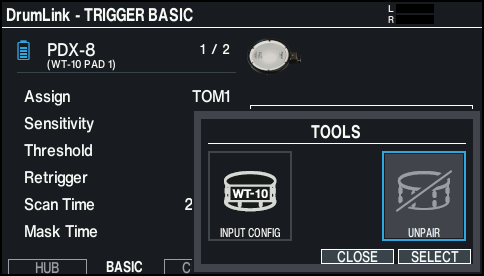
- Press the [F5] (TOOLS) button to display the TOOLS window.
- Strike to select the pad that you want to unpair.
- You can also select a pad by pressing the [ã] and [â] buttons while holding down the [ENTER] button.
- Use the cursor buttons to select “UNPAIR”, and press the [ENTER] button.
- Use the cursor buttons to select “OK”, and press the [ENTER] button.
- After the message appears, strike the selected pad to unpair it.
MEMO
When the cursor is on a paired pad in the DrumLink - HUB screen, you can also unpair the pad by pressing [F6] (UNPAIR) while holding down the [SHIFT] button.