Specifying the Input for USB Audio
Here’s how to specify the USB audio input that is input to the USB COMPUTER port.
This allows audio that is played back by the computer to be heard from the V51.
USB audio input destination settings
Ch1-2 | MASTER |
Ch3-4 | SUB |
Ch5-6 | KICK |
Ch7-8 | SNARE |
Ch9-10 | TOM1 |
Ch11-12 | TOM2 |
Ch13-14 | TOM3 |
Ch15-16 | TOM4 |
Ch17-18 | HI-HAT |
Ch19-20 | CRASH1 |
Ch21-22 | CRASH2 |
Ch23-24 | RIDE |
Ch25-26 | AUX 1 |
Ch27-28 | AUX 2 |
Ch29-30 | AUX 3 |
Ch31-32 | AUX 4 |
- Access the USB AUDIO screen.
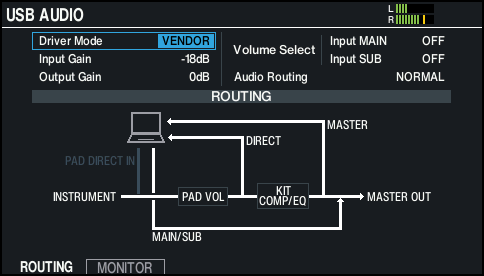
- Use the cursor buttons to select a parameter, and use the [-] [+] buttons or the dial to edit the value.

Parameter
Value
Explanation
Input Gain
-36–+12dB
Adjusts the input level
This applies to the USB audio inputs (Input MAIN, SUB) that are input from the USB COMPUTER port.
Volume Select
Input MAIN, Input SUB
These parameters set which knobs adjust the input volume for USB audio (Input MAIN, SUB).
OFF
The knobs are not used to adjust the volume.
BACKING
The [BACKING] knob is used to adjust the volume.
- [F1] (ROUTING): Checks the USB audio routing.
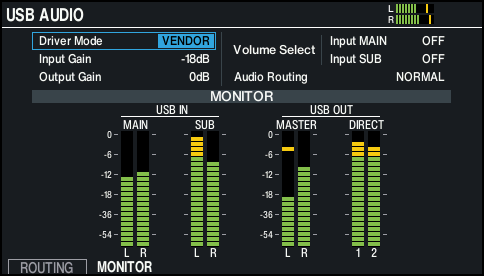
- [F2] (MONITOR): Shows the USB AUDIO level meter.
MEMO
For the USB audio input sound, you can choose from INPUT MAIN and INPUT SUB as the output destination.