Copying settings (COPY)
With the V51, you can copy the respective settings within memory or to an SD card. You can also swap the copy source and destination settings.
NOTE
When you execute a copy operation, the contents of the copy-destination are overwritten.
If the destination contains settings that you want to keep, back them up to an SD card.
- Press the [SETUP] button.
- Use the cursor buttons to select “COPY”, and press the [ENTER] button.
- The COPY screen appears.
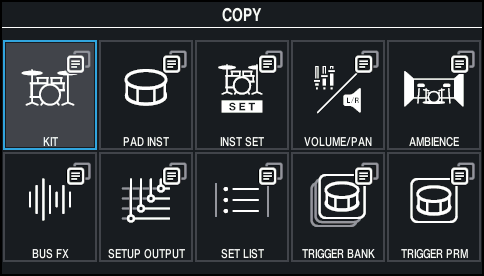
- Use the cursor buttons or the dial to select the menu that you want to edit, and press the [ENTER] button.

Menu
Explanation
KIT
Copies the drum kit.
PAD INST
Copies the pad instruments.
INST SET
Copies multiple instruments as a set.
VOLUME/PAN
Copies the VOLUME/PAN settings.
AMBIENCE
Copies the ambience settings.
Ø “Recreating the reverberations of a performance location (AMBIENCE)”
BUS FX
Copies the BUS FX settings.
SETUP OUTPUT
Copies the output settings.
SET LIST
Copies the set lists.
TRIGGER BANK
Copies the trigger bank settings.
Ø “Trigger settings”
TRIGGER PRM
Copies the trigger parameter settings.
- Copy the settings according to the menu item that you selected.